FIVEWIN Withdraw – Bank Withdrawal & Verification Guide
- 1. FIVEWIN Withdraw – How the Withdrawal Process Works
- 2. How to Withdraw Money from FIVEWIN
- 3. Withdrawal Account Verification
- 4. How to Link a Bank Account for Withdrawal
- 5. How to Set Up Your Fund Password
- 6. Withdrawal Requirements & Important Instructions
- 7. Withdrawal Processing & Customer Support
- 8. Frequently Asked Questions About FIVEWIN Withdrawal
- 9. Ready to Submit Your FIVEWIN Withdrawal?
FIVEWIN Withdraw – How the Withdrawal Process Works
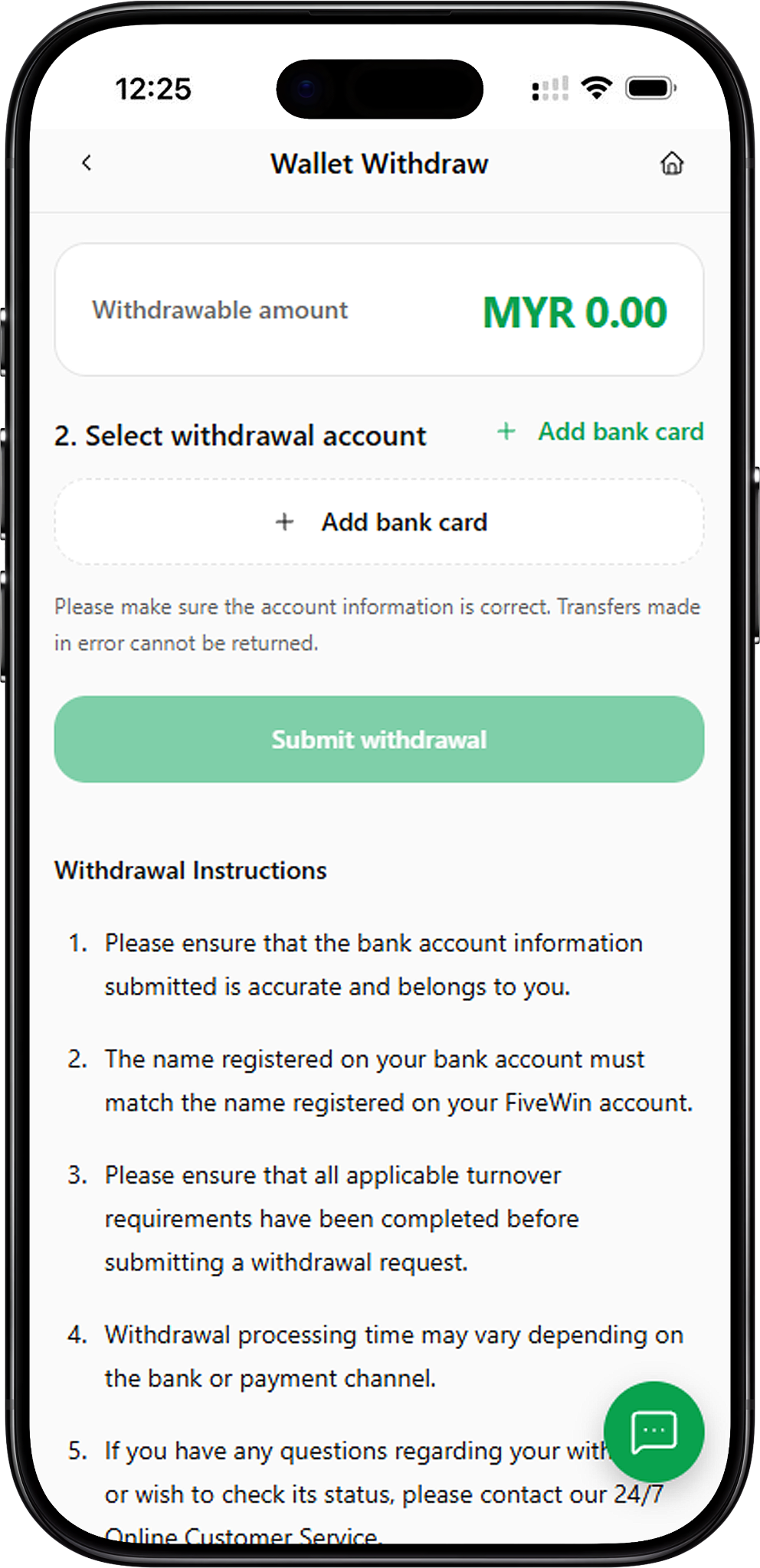
The FIVEWIN withdrawal process is managed through the Wallet Withdraw section of the member account. Members can review their withdrawable balance, select a linked bank account and submit a withdrawal request after completing the necessary account requirements. The platform also includes bank verification and fund password settings to support account security during withdrawal transactions.
Accessing the Wallet Withdraw Page
Members can access the withdrawal section by signing in to their FIVEWIN account and selecting Wallet Withdraw from the account navigation menu. The page displays the withdrawable amount, withdrawal account selection and the Submit Withdrawal button. Members should review the information shown before proceeding with a withdrawal request.
Understanding Your Withdrawable Balance
The Wallet Withdraw page displays a Withdrawable Amount field showing the funds currently available for withdrawal. For example, the supplied interface displays MYR 0.00 when no withdrawable balance is available. Members should check their current withdrawable amount before attempting to submit a withdrawal request.
Bank Account Requirements for Withdrawal
FIVEWIN requires members to use accurate banking information associated with their account. The bank account holder’s name must match the name registered on the FIVEWIN account. Members should also ensure that the selected withdrawal account belongs to them and that the banking details are correct before submitting a request.
How to Withdraw Money from FIVEWIN
Members can submit a FIVEWIN withdrawal request through the Wallet Withdraw page after completing the required verification, bank account linking and fund password setup. The following steps explain how to prepare the account and proceed with a bank withdrawal using the features shown on the platform.
Step 1: Log In to Your FIVEWIN Account
Access your FIVEWIN account using your registered login details. Once signed in, open the member account navigation menu to locate the available wallet and account management options.
Step 2: Open the Wallet Withdraw Section
Select Wallet Withdraw from the account menu. The withdrawal page displays your available withdrawable balance and the withdrawal account selection area. If the required account verification or fund password setup has not been completed, the platform may display an additional form or notification before allowing you to proceed.
Step 3: Complete Your Bank Account Verification
If the Complete Before Withdrawal verification form appears, enter your Full Name, select your bank and provide the requested Card Number containing 10 to 16 digits. Review the information carefully before selecting the verification submission button. If the form displays Resubmit Verification, follow the instructions to submit the required details again.
Step 4: Add Your Withdrawal Bank Account
Under Select Withdrawal Account, choose Add Bank Card if no bank account has been linked. The Add Bank Card form requires members to select a bank and enter a card number containing 10 to 16 digits. After checking the information, select Confirm Add to submit the bank account details.
Step 5: Set Up Your Fund Password
If you have not created a fund password, FIVEWIN displays a notification explaining that a password must be set before making a withdrawal. Select Set Now to access the Fund Password page. Enter a six-digit password, confirm it in the second field and select Create Fund Password. The password must not contain repeated or sequential numbers.
Step 6: Check Your Withdrawable Amount
Return to the Wallet Withdraw page and review the amount displayed under Withdrawable Amount. Ensure that sufficient funds are available and that any applicable turnover requirements have been completed before proceeding with the withdrawal request.
Step 7: Select Your Withdrawal Account
In the Select Withdrawal Account section, choose the bank account linked to your FIVEWIN account. Confirm that the bank information is accurate and belongs to you. FIVEWIN warns that transfers made using incorrect account information cannot be returned.
Step 8: Submit Your Withdrawal Request
After completing the required account setup and reviewing the withdrawal information, select Submit Withdrawal to proceed with the request. Follow any additional instructions displayed by the platform. Withdrawal processing time may vary depending on the bank or payment channel involved.
Withdrawal Account Verification
FIVEWIN may require members to complete bank account verification before allowing withdrawals. The verification form requests personal and banking information to support the withdrawal account setup process. Members should ensure that all submitted details are accurate and consistent with their registered account information.
Enter Your Registered Full Name
The withdrawal verification form includes a Full Name field. Enter your name accurately and ensure that it matches the name associated with your FIVEWIN account and bank account. FIVEWIN requires the registered bank account name to match the member account name for withdrawal purposes.
Select Your Bank
Choose your bank from the available selection list. The verification interface provides a Search Bank field, allowing members to locate their banking institution. The supplied options include Maybank, CIMB, Public Bank, RHB, Hong Leong Bank, HSBC, OCBC, Standard Chartered and other listed financial institutions. Available banks may change.
Enter Your Bank Card Number
The supplied verification form requests a Card Number containing 10 to 16 digits. Members should enter only the banking information requested through the appropriate verification interface and check that it corresponds to the selected institution. Incorrect banking information may prevent successful verification. Never share banking passwords, PINs or one-time verification codes.
Submit or Resubmit Verification
After entering the required information, review the Full Name, Bank and Card Number fields before submitting the form. If the platform displays Resubmit Verification, members can use this option to submit their verification details again. Ensure that any previously incorrect information has been corrected before resubmission.
Why Accurate Withdrawal Verification Matters
Accurate verification information helps ensure that withdrawal requests are associated with the correct member and bank account. FIVEWIN requires the bank account holder’s name to match the registered member name and warns that transfers made using incorrect account information cannot be returned.
How to Link a Bank Account for Withdrawal
FIVEWIN provides an Add Bank Card function within the Wallet Withdraw section. Members can use this feature to link a bank account for withdrawal transactions. The bank linking form requires the selection of a supported bank and the submission of a valid card number.
Step 1: Select Add Bank Card
Open Wallet Withdraw and locate the Select Withdrawal Account section. If no bank account is linked, select Add Bank Card to open the bank account linking form. The form displays the required banking information fields.
Step 2: Choose Your Banking Institution
Select the Bank field to open the available bank list. The supplied FIVEWIN interface displays banking options including Affin Bank Berhad, Alliance Bank Malaysia Berhad, Bank Simpanan Nasional, CIMB Bank Berhad, Hong Leong Bank Berhad, Malayan Banking Berhad, Public Bank Berhad and RHB Bank Berhad. Additional institutions may appear in the current bank selection interface.
Step 3: Enter Your Bank Card Number
Enter the requested Card Number in the designated field. The supplied form specifies a number containing 10 to 16 digits. Ensure that the information is entered correctly and corresponds to the bank account intended for withdrawal transactions.
Step 4: Confirm Your Bank Account Details
Review the selected bank and card number before selecting Confirm Add. The platform also provides a Cancel option if you need to exit the form without submitting the information.
Important Information About Default Bank Cards
The supplied FIVEWIN Add Bank Card form states that default cards cannot be deleted. Members should carefully verify their bank selection and card number before confirming the addition of a bank account, particularly when setting up a default withdrawal account.
Using Your Linked Bank Account for Withdrawals
Once the bank account has been added and is available for selection, members can return to the Wallet Withdraw page and choose it as their withdrawal account. Always confirm that the selected banking details are correct before submitting a withdrawal request.
How to Set Up Your Fund Password
FIVEWIN requires members to create a fund password before making a withdrawal. The fund password is managed through the Security Center and provides an additional account security requirement for withdrawal transactions. Members who have not configured this password will receive a notification when attempting to access the withdrawal process.
Step 1: Open the Fund Password Setup
When accessing Wallet Withdraw without an existing fund password, FIVEWIN displays a Fund Password notification stating that a password must be created before making a withdrawal. Select Set Now to continue to the Fund Password setup page.
Step 2: Create a Six-Digit Fund Password
Enter a six-digit password in the Fund Password field. FIVEWIN requires the password to contain exactly six digits. Repeated or sequential numbers are not allowed, so members should choose a combination that meets the displayed password requirements.
Step 3: Confirm Your New Fund Password
Enter the same six-digit combination in the Confirm New Fund Password field. Ensure that both entries match and comply with the password requirements shown on the page.
Step 4: Submit Your Fund Password
After entering and confirming the password, select Create Fund Password. If the platform displays a validation error, review the requirements and enter a different six-digit combination that does not contain repeated or sequential numbers.
Keeping Your Fund Password Secure
Members should keep their fund password confidential and avoid sharing it with other individuals. The password should not be stored in publicly accessible locations or disclosed through unofficial communication channels.
Withdrawal Requirements & Important Instructions
FIVEWIN provides withdrawal instructions that members should review before submitting a request. These requirements cover bank account ownership, registered account names, applicable turnover conditions and payment processing. Following the displayed instructions helps reduce the risk of incorrect withdrawal submissions.
Use a Bank Account That Belongs to You
FIVEWIN requires members to submit accurate banking information associated with their own bank account. Before requesting a withdrawal, confirm that the selected account belongs to you and that all banking details are correct.
Ensure Your Bank Account Name Matches
The name registered on the withdrawal bank account must match the name registered on the FIVEWIN account. Members should verify this information during the bank linking and account verification processes.
Complete Applicable Turnover Requirements
FIVEWIN instructs members to complete all applicable turnover requirements before submitting a withdrawal request. These requirements may be relevant to account activity or promotions. Members should review the applicable conditions before proceeding with a withdrawal.
Verify Your Withdrawal Account Information
Before submitting a request, carefully review the selected bank account details. FIVEWIN warns that transfers made using incorrect account information cannot be returned. Members should therefore check their banking information before confirming a withdrawal.
Review Your Available Withdrawable Balance
The Wallet Withdraw page displays the amount currently available for withdrawal. Members should check this balance before attempting to submit a request, as the displayed withdrawable amount may differ from other wallet information depending on applicable account conditions.
Withdrawal Processing & Customer Support
Withdrawal processing on FIVEWIN may vary depending on the bank or payment channel used. Members should ensure that their account information is correct and that all applicable withdrawal requirements have been completed before submitting a request. The supplied platform information also identifies 24/7 Online Customer Service for members who need withdrawal assistance.
Understanding Withdrawal Processing Time
FIVEWIN states that withdrawal processing time may vary depending on the bank or payment channel. The supplied withdrawal interface does not specify a fixed processing duration, so members should not assume that every withdrawal will be completed within the same timeframe.
Checking Your Withdrawal Status
Members who wish to check the status of a withdrawal can contact FIVEWIN Online Customer Service. The platform also provides a Transaction Records section within the account navigation menu, although the supplied information does not establish which withdrawal status details are displayed there.
What to Do If Your Withdrawal Is Delayed
If a withdrawal takes longer than expected, review the banking information associated with the request and confirm that all applicable turnover requirements have been completed. Members can contact FIVEWIN Online Customer Service for further assistance regarding the transaction.
Contacting FIVEWIN Online Customer Service
FIVEWIN’s supplied platform information identifies 24/7 Online Customer Service for withdrawal questions and status enquiries. Members can use the customer service option displayed on the platform to request assistance with withdrawal transactions.
Frequently Asked Questions About FIVEWIN Withdrawal
Find answers to common questions about FIVEWIN Withdraw, including bank withdrawals, account verification, fund password requirements, bank card linking, turnover conditions and withdrawal processing.
How do I withdraw money from FIVEWIN?
Sign in to your FIVEWIN account and open Wallet Withdraw. Complete any required account verification, link your bank account and set up your fund password. Once the necessary requirements have been completed, review your withdrawable balance, select your withdrawal account and submit the withdrawal request.
Where can I find the FIVEWIN withdrawal page?
The withdrawal page is available through the Wallet Withdraw option in the member account navigation menu. This section displays the withdrawable amount, bank account selection and withdrawal submission button.
Do I need to verify my bank account before withdrawing?
FIVEWIN may require members to complete a verification form before proceeding with a withdrawal. The supplied form requests the member’s full name, bank selection and a card number containing 10 to 16 digits.
How do I add a bank account for withdrawal?
Open Wallet Withdraw and select Add Bank Card. Choose your banking institution, enter the required card number and select Confirm Add after reviewing the information.
Which banks are supported for withdrawals?
The supplied bank selection interfaces include Maybank, CIMB, Public Bank, RHB, Hong Leong Bank, Affin Bank, Alliance Bank, Bank Simpanan Nasional, OCBC, HSBC, Standard Chartered and other listed institutions. Members should check the current bank selection menu for available options.
What is the FIVEWIN fund password?
The fund password is a six-digit password that members must create before making a withdrawal. FIVEWIN requires the password to contain exactly six digits and prohibits repeated or sequential numbers.
How do I create a FIVEWIN fund password?
Access the Fund Password setup page through the Set Now notification or the relevant Security Center section. Enter a six-digit password, confirm it in the second field and select Create Fund Password.
Can I withdraw without setting a fund password?
FIVEWIN displays a notification stating that members must set a fund password before making a withdrawal. Members who have not completed this requirement should create their password before proceeding.
Does my bank account name need to match my FIVEWIN account?
Yes. FIVEWIN states that the name registered on the withdrawal bank account must match the name registered on the FIVEWIN account.
Can I use someone else’s bank account for withdrawal?
FIVEWIN requires members to ensure that the submitted bank account belongs to them. The platform also requires the bank account holder’s name to match the registered FIVEWIN account name.
Can I delete a default bank card on FIVEWIN?
The supplied FIVEWIN Add Bank Card form states that default cards cannot be deleted. Members should carefully review their banking information before adding a card that may become the default withdrawal account.
Do I need to complete turnover requirements before withdrawing?
Yes. FIVEWIN instructs members to complete all applicable turnover requirements before submitting a withdrawal request. Members should review the relevant account or promotion conditions before proceeding.
How long does a FIVEWIN withdrawal take?
FIVEWIN states that withdrawal processing time may vary depending on the bank or payment channel. The supplied interface does not specify a guaranteed processing timeframe.
What should I do if my withdrawal is delayed?
If your withdrawal is delayed, contact FIVEWIN Online Customer Service for assistance. Ensure that your banking information is accurate and that all applicable withdrawal requirements have been completed.
Why is my withdrawable balance MYR 0.00?
A displayed withdrawable balance of MYR 0.00 indicates that the interface currently shows no funds available for withdrawal. Members should review their account information and applicable withdrawal conditions or contact customer service if clarification is required.
What happens if I enter incorrect withdrawal bank details?
FIVEWIN warns that transfers made using incorrect account information cannot be returned. Members should carefully verify their bank selection and account details before submitting a withdrawal request.
Where can I review the FIVEWIN Withdrawal Agreement?
Members can review the FIVEWIN Withdrawal Agreement at https://fivewin.com.my/en/agreement-center/withdrawal-agreement for information about withdrawal requirements, account verification, bank account responsibilities, transaction processing and applicable conditions.
Ready to Submit Your FIVEWIN Withdrawal?
Access the FIVEWIN Wallet Withdraw page to review your withdrawable balance, complete the required verification and select your linked bank account. Ensure that your fund password is configured and all applicable withdrawal requirements are met before submitting your request.