FIVEWIN Login – Sign In to Your Account
Sign in to your FIVEWIN account using your registered username and password. The login page provides access through mobile H5 and desktop web browsers, with options for password visibility, account recovery and registration. Follow the steps below to access your account and learn how to resolve common sign-in issues.
How to Log In to Your Account Step by Step
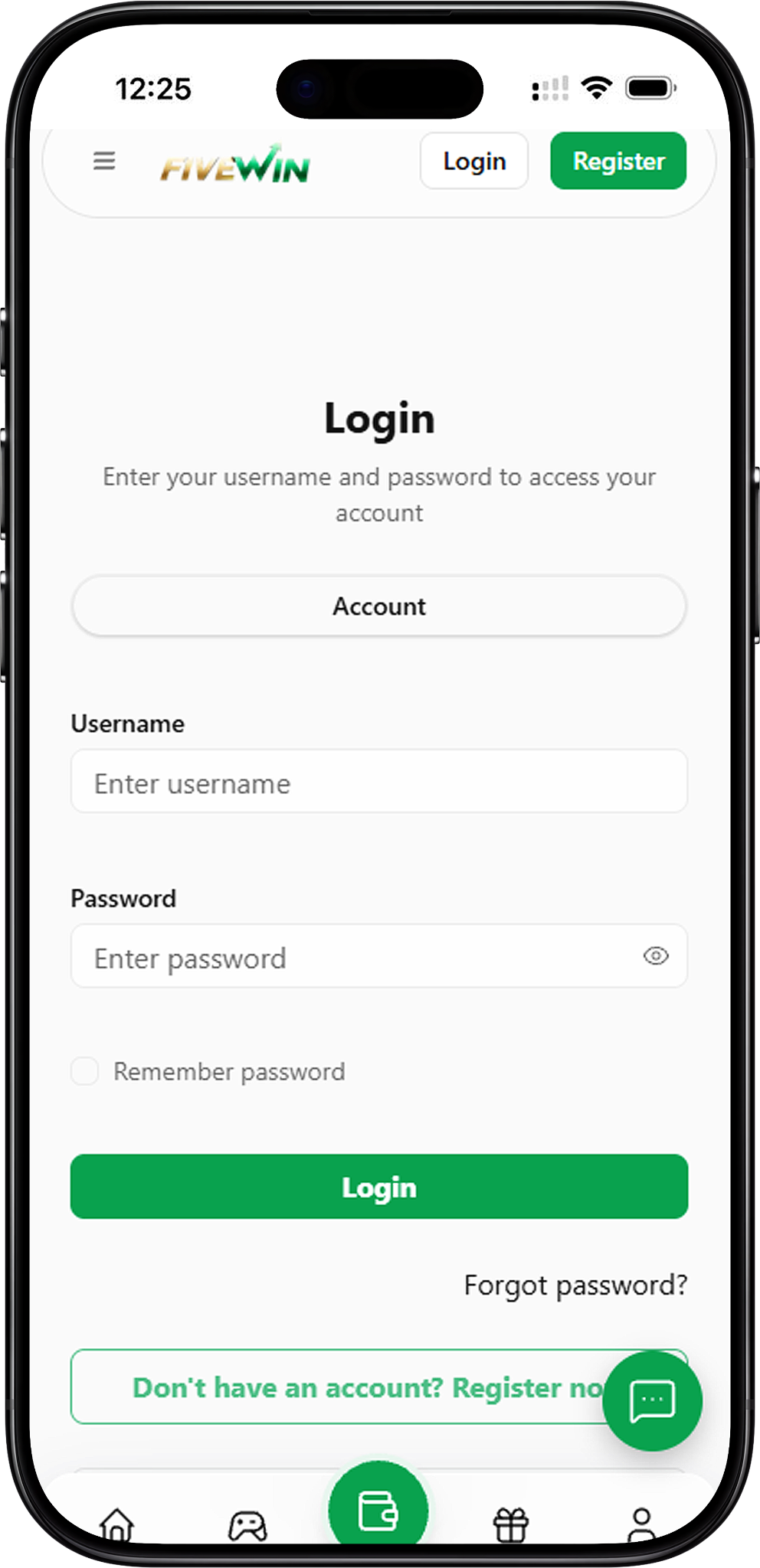
The login page allows registered users to access their accounts using a username and password. Follow these steps to enter your credentials, review the available options and complete the sign-in process.
Step 1: Open the Login Page
Visit the FIVEWIN website and select Login to open the account sign-in form. The page displays fields for your username and password, along with options for remembering your password and recovering account access.
Step 2: Enter Your Registered Username
Locate the Username field and enter the username associated with your account. Check the spelling carefully to ensure you are using the correct login information.
Step 3: Enter Your Account Password
Enter your password in the Password field. If you want to check the characters you have entered, select the eye icon beside the field to show or hide your password.
Step 4: Select Remember Password (Optional)
The login form includes a Remember password checkbox. You can select this option if you want to use the password-remembering feature. For better account security, avoid enabling this option on shared or public devices.
Step 5: Click Login to Sign In
After entering your username and password, review the information and click the Login button. The system will process your credentials and allow access to your account if the information is accepted.
Login via H5 and Web
You can access your account through compatible browsers on mobile devices and desktop computers. Both H5 and Web login use the same basic sign-in process, allowing you to enter your credentials without needing a separate application.
H5 Login on Mobile Devices
H5 refers to mobile-friendly browser access. Open your mobile browser, visit the FIVEWIN website and navigate to the Login page. Enter your registered username and password, then select Login to submit your details.
Web Login on Desktop
To sign in using a desktop computer, open your preferred web browser and visit the website. Navigate to the Login page, enter your username and password, and click Login to access your account.
Differences Between H5 and Web Login
H5 generally refers to mobile browser access, while Web login commonly describes accessing a website through a desktop browser. Both methods follow the same steps: open the login form, enter your account credentials and submit the information.
Login Features and Password Options
The sign-in page includes several features to help users enter their credentials, review passwords and access account-related services. Understanding these options can make the login process more convenient.
Username and Password Login
The account login form requires a registered username and password. Enter the correct credentials and review both fields before submitting your information.
Show or Hide Your Password
The Password field includes an eye icon that allows you to show or hide the entered characters. This feature can help you identify typing mistakes before attempting to sign in.
Remember Password Option
The Remember password checkbox is available below the password field. This optional feature allows users to select the password-remembering setting. Avoid enabling it when using shared or public computers.
Forgot Password and Account Recovery
If you cannot remember your password, select Forgot password? below the Login button. Follow the instructions displayed on the recovery page to continue the account recovery process.
Register a New Account
If you do not have an account, select Don’t have an account? Register now on the login page. This option directs you to the registration form, where you can create a username, set a password and complete the required verification steps.
How to Resolve Login Issues
If you experience difficulty signing in, start by checking your account credentials and browser connection. Common login problems may involve incorrect usernames, password errors or forgotten account information.
Check Your Username and Password
Make sure you have entered the correct username and password associated with your account. Check for typing errors, unnecessary spaces and incorrect capitalization before trying again.
Review Your Password Before Submitting
If you are unsure whether your password was entered correctly, use the eye icon to review the characters. Make any necessary corrections before clicking Login.
Use the Forgot Password Option
If you cannot remember your password, select Forgot password? on the login page. Follow the available recovery instructions instead of repeatedly entering an incorrect password.
Check Your Browser and Internet Connection
If the login page does not load properly, check your internet connection and refresh the page. You can also try reopening the website in your browser. Always verify the website address before entering your account credentials.
Return to the Homepage
The login page includes a Back to home button. Select this option if you want to leave the sign-in form and return to the homepage without submitting your credentials.
Frequently Asked Questions About Login
Find answers to common questions about FIVEWIN account access, H5 and Web login, password recovery, registration and sign-in problems.
How do I log in to my FIVEWIN account?
Open the login page, enter your registered username and password, and click Login. If your credentials are accepted, you can proceed to your account.
Can I access my account through H5?
Yes. You can open the website using a mobile browser and navigate to the login form. H5 allows users to access web pages through compatible mobile browsers without installing a separate application.
How do I sign in using a Web browser?
Open your preferred browser, visit the website and navigate to the Login page. Enter your username and password, then select Login to submit your credentials.
What information is required to log in?
The login form requires your registered username and password. Both fields must be completed before submitting your account credentials.
What should I do if I forget my password?
Select Forgot password? on the login page to access the available recovery process. Follow the instructions provided to continue recovering access to your account.
Does FIVEWIN have a Remember Password option?
Yes. The login page includes a Remember password checkbox below the password field. This optional feature is available for users who want to use the password-remembering setting.
Can I register a new account from the login page?
Yes. Select Don’t have an account? Register now to open the registration page. Follow the instructions to create your account and complete the required verification process.
Why am I unable to log in?
Login difficulties may occur because of incorrect credentials, forgotten passwords or browser connectivity issues. Review your username and password, check your internet connection and use the recovery option if necessary.
Can I return to the homepage without logging in?
Yes. Select Back to home on the login page to return to the homepage without completing the sign-in process.
Sign In to Your FIVEWIN Account
Ready to access your account? Open the login page, enter your registered username and password, and complete the sign-in process through your preferred browser.